Complete Guide to SERP Analysis for Indian Market
Guide to the SERP Analysis Tool
Overview
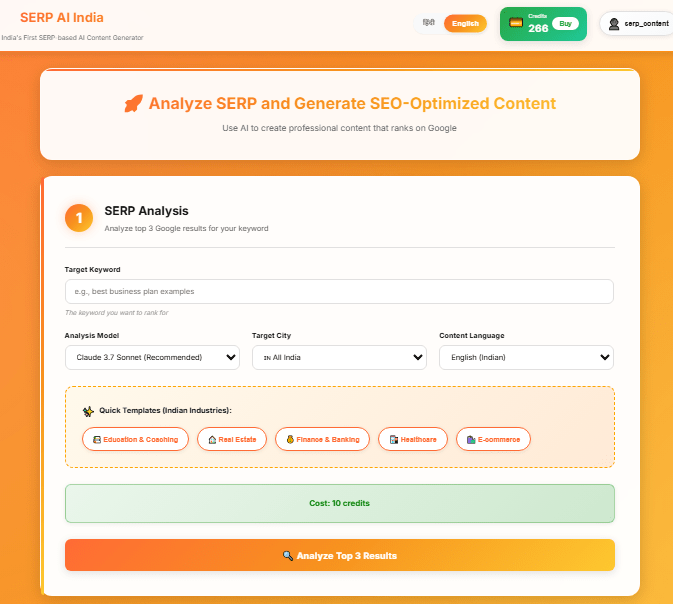
The SERP Analysis Tool at ContentSERP.in is designed to help you understand the competitive landscape of search engine results pages (SERPs) for specific keywords. By analyzing the top three Google search results for any keyword, this tool identifies content gaps and opportunities, providing insights tailored for the Indian market.
How to Use the SERP Analysis Tool
Follow these simple steps to use the SERP Analysis Tool:
- Log In to Your Account: Go to the ContentSERP.in website and log in using your credentials.
- Navigate to the SERP Analysis Tool: From the dashboard, click on the “SERP Analysis” option in the main menu.
- Enter Your Keyword: Type in the keyword you want to analyze (for example, “best smartphone under 20000” or “top e-commerce platforms in India”).
- Select Language: Choose the language for the analysis (English or Hindi).
- Start Analysis: Click the “Analyze” button to initiate the SERP analysis. This will consume 10 credits from your account.
- View Results: Once the analysis is complete, you will see detailed insights, including:
- Meta titles and descriptions
- Word count
- Content structure
- Competitor gaps (missing topics)
- Export Reports: If you want to save the analysis for future reference, use the export option to download the report in PDF or CSV format.
Tips & Best Practices Specific to Indian Users
- Focus on Local Keywords: Use region-specific keywords like “best restaurants in Mumbai” or “top tutoring centers in Delhi” for better results.
- Analyze Competitor Content: Pay attention to what your competitors are doing. Look for content gaps where you can provide better or more comprehensive information.
- Utilize Bilingual Content: If your target audience speaks Hindi and English, consider analyzing keywords in both languages to broaden your reach.
- Regularly Update Your Research: The Indian market is dynamic; thus, frequent analysis of keywords can help you stay ahead of trends.
Common Issues & Solutions
- Issue: Analysis is not generating results.
- Solution: Ensure that your internet connection is stable and try refreshing the page. If the problem persists, contact support.
- Issue: Unable to export reports.
- Solution: Make sure you have sufficient credits in your account. Check if your browser has any extensions that might block downloads.
- Issue: Results do not match expectations.
- Solution: Double-check the keyword and ensure that it is relevant to your target audience. Consider using synonyms or variations of the keyword.
Related Features from ContentSERP
The SERP Analysis Tool works best in conjunction with other features of ContentSERP.in:
- Keyword Research Tool: Use this tool to find the best keywords for your niche before performing a SERP analysis.
- AI Content Generation: Once you have insights from the SERP analysis, create SEO-optimized content tailored to those insights.
- Image Prompt Generator: Enhance your articles with relevant images generated from your content prompts.
- Quick Templates: Utilize industry-specific templates to create content quickly based on the insights gained from the SERP analysis.
By using the SERP Analysis Tool effectively, you can significantly enhance your SEO strategy and content quality, saving you time and improving your online visibility in the Indian market. “`