Stop Guessing. Start Ranking with India's #1 Free SERP Analysis Tool
The all-in-one Growth Engine. Analyze top Google competitors, track Google rankings with Rank Tracker, decode competitor backlinks with AI Strategy, and now generate massive 2,500+ word Pillar Pages optimized for Google AI Overviews (GEO) with Auto-Internal Linking & Social Media Atomization.
ContentSERP is India's free SERP analysis tool for bloggers, local businesses, and digital agencies. It lets you instantly analyze the top Google search results for any keyword, preview your SERP snippet, track keyword rankings over time, find content gaps versus competitors, and generate AI-written, GEO-optimized articles in English or Hindi — all at ₹0 to ₹999 INR, with no credit card required to start.
What is ContentSERP?
ContentSERP is a free SERP analysis tool built specifically for the Indian market. Unlike global tools such as Ahrefs or Semrush that charge ₹10,000+ per month in USD, ContentSERP offers INR-priced plans starting at ₹0, giving Indian SEOs, bloggers, and local businesses access to enterprise-level data.
The platform covers the entire SEO workflow in one place: from keyword research and competitor content gap analysis to rank tracking, SERP snippet preview, AI topical map generation, and automated 2,500-word pillar page writing in both English and Hindi. Its v2.0 update introduced WordPress auto-sync with internal linking and a social media atomizer.
How ContentSERP Works in 5 Steps
From keyword to ranked article — in one platform, under 10 minutes.
Sign Up Free
Create your account in 30 seconds. No credit card. Get 10 free credits instantly.
Enter Your Keyword
Type any keyword and the SERP Analyzer fetches the top-100 Google India results live.
Analyze Competitors
Find content gaps, preview your SERP snippet, and reverse-engineer competitor strategies.
Track Rankings
Monitor your keyword positions with the built-in Rank Tracker and chart your progress over time.
Generate & Publish
One click creates a 2,500+ word AI pillar page and syncs it directly to WordPress with internal links.
Built-in Rank Tracker — Monitor Google India Rankings
Track any keyword's position on Google India daily. See historical rank changes, identify winning pages, and measure the real impact of every article you publish.
AI Topical Maps — Plan Your Entire Content Cluster
New in v2.0. Generate a full topical authority blueprint: pillar pages, supporting articles, and internal linking strategy — all planned by AI in one click. Dominate your niche on Google and AI search engines like Perplexity and ChatGPT.
SERP Snippet Preview & Simulator
See exactly how your page appears in Google before you publish. Optimize your title and meta description to maximize click-through rates — just like Mangools, but built for India.
Craft the Perfect
Google Result — Live
Most Indian blogs lose 30–40% of potential clicks because their title tag and meta description are either too long, too short, or simply uncompelling. ContentSERP's SERP Simulator solves this. Type your title and meta, and see a pixel-accurate preview of your Google listing in real time.
The tool also flags character count warnings, highlights keyword placement, and shows mobile vs. desktop rendering — giving you the same pre-publish confidence that tools like Mangools charge $50+/month for.
ContentSERP vs Competitors
| Feature | ContentSERP | Ahrefs | Semrush | Mangools |
|---|---|---|---|---|
| Free Plan Available | ✅ Yes (10 credits) | ⚠️ Limited | ⚠️ Limited | ⚠️ Limited |
| INR Pricing | ✅ ₹999 one-time | ❌ USD only | ❌ USD only | ❌ USD only |
| SERP Snippet Preview | ✅ Yes | ❌ No | ⚠️ Partial | ✅ Yes |
| Rank Tracking | ✅ Yes (India) | ✅ Yes | ✅ Yes | ✅ Yes |
| AI Topical Maps | ✅ Yes (v2.0) | ❌ No | ❌ No | ❌ No |
| Hindi Content Support | ✅ Yes | ❌ No | ❌ No | ❌ No |
| YouTube Competitor Analysis | ✅ Yes | ❌ No | ⚠️ Limited | ❌ No |
| AI Article Writer (2,500+ words) | ✅ Yes | ❌ No | ❌ No | ❌ No |
One Platform. Three Ways to Grow.
Select your goal to explore our specialized tools.
Dominate Google with
AI & Deep Analytics
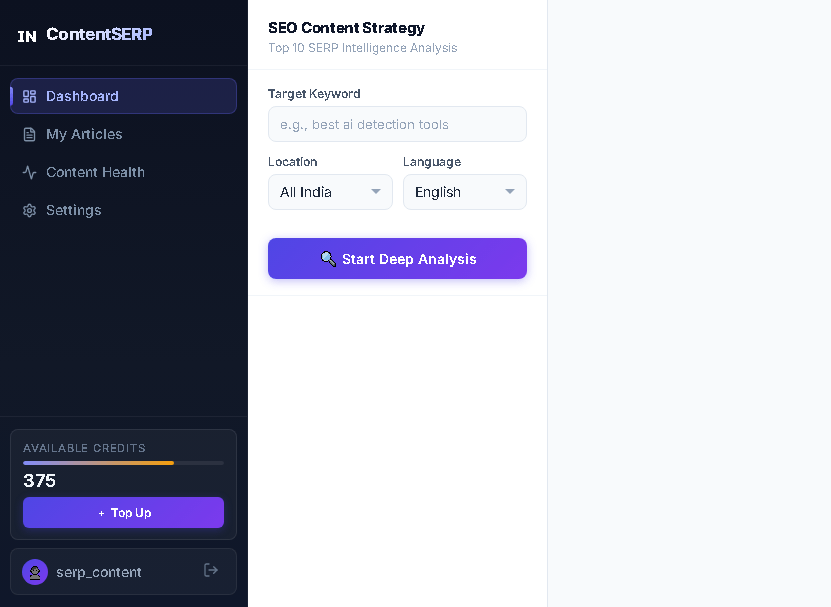
Stop writing blindly. Start by finding high-volume topics with our Keyword Research Tool. Next, spy on your rivals using the Competitor Analytics Tool to find their weaknesses.
NEW in v2.0: Our upgraded AI Content Writer now drafts massive 2,500+ word pillar pages. It securely syncs with your WordPress to automatically weave SEO-boosting internal links and instantly atomizes your post into Twitter, LinkedIn, and Facebook content. Use AI Topical Maps to plan entire content clusters before you write a single word.
Own Your Neighborhood with
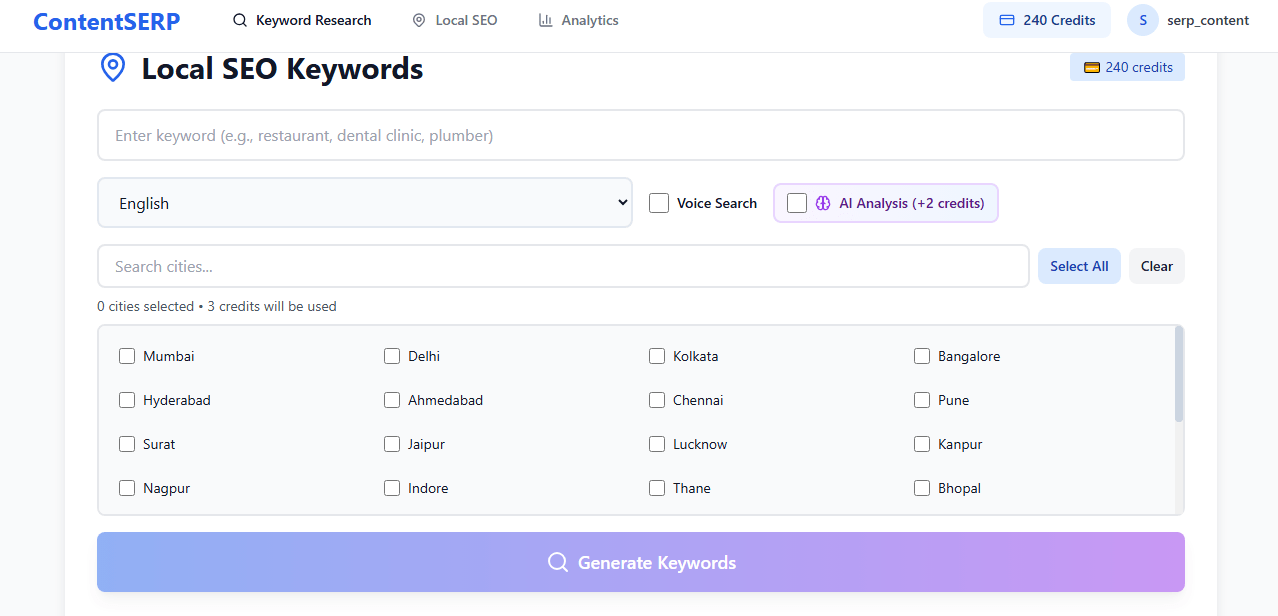
India's Local Keyword Tool
Don't lose customers to the shop down the street. Our Local Keyword Tool helps you uncover high-intent "Near Me" queries specific to Indian cities — from Delhi to Chennai, Mumbai to Kolkata.
Unlike global tools, ContentSERP's local SEO module understands Indian city search volumes and regional language intent. Combine it with our Keyword Research Tool to dominate both map packs and organic results across Tier-1, Tier-2, and Tier-3 Indian cities.
Crack the YouTube Algorithm
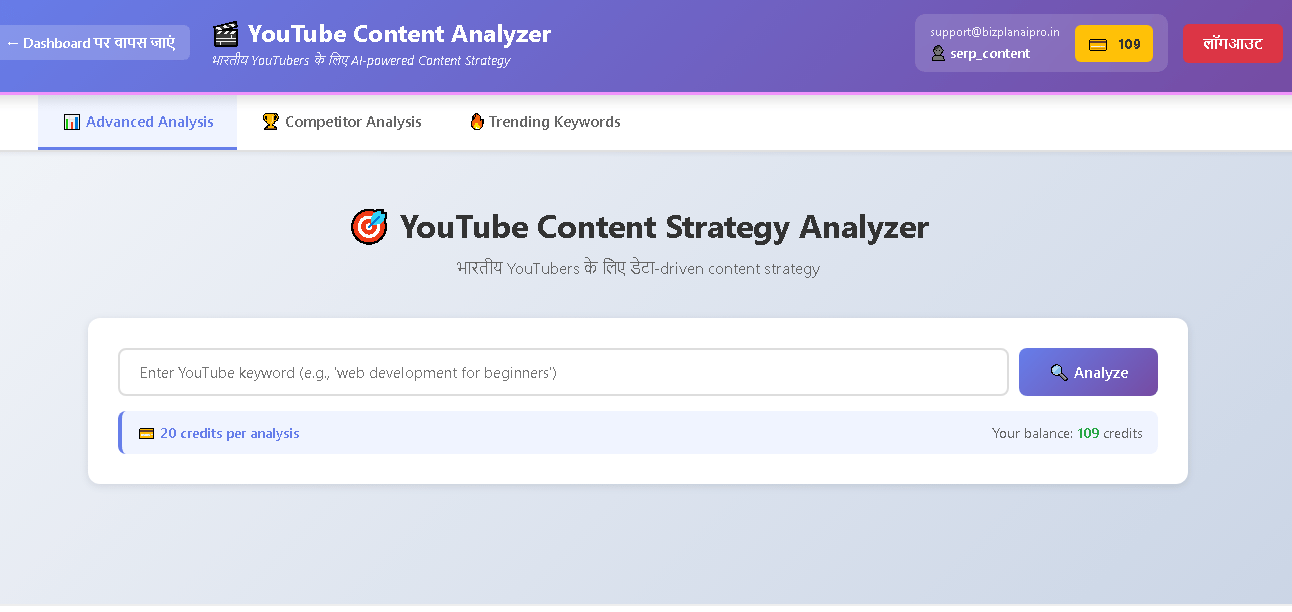
Stop filming in the dark. Spy on viral videos using our dedicated YouTube Analyzer Tool. See exact tags, description keywords, and content structure before you upload.
Trusted by 500+ Indian Marketers
See why ContentSERP is the preferred free SERP analysis tool for Indian SEOs, bloggers, and local businesses.
"The Content Gap Analysis and new Auto-Internal Linking are game changers. It writes 2,500-word articles that actually rank #1 in weeks."
Tech Blogger, Delhi
"Finally a tool that understands Hindi SEO. The AI writer generates native-sounding Hindi content, not just translations. The rank tracker helps me prove ROI to clients."
Digital Agency, Mumbai
"I use the YouTube Competitor Analysis daily. And the SERP snippet preview tool helped me increase click-through rates by 40% in 30 days."
YouTuber (100k Subs)
Simple Pricing in INR. No Hidden Fees.
Start with our Free Plan. Upgrade only when you grow.
Starter Free
Forever free
- 10 Free Credits
- Basic SERP Analysis
- SERP Snippet Preview
- No Credit Card Needed
Pro
One-time · Forever credits
- 100 Credits
- 2500+ Word GEO-Optimized Pages
- Auto-WP Internal Linking
- AI Topical Maps
- Rank Tracker (Google India)
- SERP Snippet Preview
- Social Media Atomizer
- Priority Support
Frequently Asked Questions
Everything you need to know about ContentSERP — India's free SERP analysis tool.
Is this really a free SERP analysis tool?
Yes! ContentSERP offers a free plan with 10 credits. You can use this to perform SERP analysis, check rankings, preview your SERP snippet, or generate AI articles without entering a credit card. No hidden charges, no expiry on free credits.
What is a SERP snippet preview and does ContentSERP have one?
A SERP snippet preview (also called a SERP simulator) shows you exactly how your title tag and meta description will appear in Google search results before you publish. ContentSERP includes this feature free of charge — helping you craft compelling, click-worthy listings that drive more organic traffic.
Does ContentSERP have a rank tracker?
Yes. ContentSERP includes a dedicated Rank Tracker that monitors your keyword positions on Google India daily. You get historical ranking charts, position change alerts, and multi-keyword tracking so you can measure the real-world impact of every article you publish.
What are AI Topical Maps and how do they help SEO?
AI Topical Maps are strategic content blueprints that show you every subtopic, supporting article, and internal link needed to establish full topical authority on a subject. ContentSERP v2.0 generates these maps automatically. Instead of publishing random blog posts, you build a structured content cluster that Google — and AI search engines like Perplexity and ChatGPT — recognize as authoritative.
Does the AI write long-form pillar pages?
Yes! With our v2.0 update, the AI is engineered to generate highly detailed, 2,500+ word articles complete with H2/H3 structures, comparison tables, FAQ schema, and auto internal linking — designed to dominate SERPs and appear in Google AI Overviews.
Does the AI Article Generator support Hindi?
Absolutely. ContentSERP is built for India. Our AI generates high-quality content in both English and Hindi, perfect for local SEO, regional blogs, and Hindi-language affiliate websites. The Local Keyword Tool also surfaces Hindi and regional language search queries.
How is ContentSERP different from Ahrefs or Semrush?
ContentSERP focuses specifically on the Indian market with INR pricing (₹0 to ₹999 one-time vs ₹10,000+/month for Ahrefs or Semrush). We offer features no global tool provides: YouTube Competitor Analysis, Hindi content generation, AI Topical Maps, Automated Internal Linking, SERP Snippet Preview, and a Local Keyword Tool built for Indian cities.
Who should use ContentSERP?
ContentSERP is built for:
- SEO professionals and digital marketing agencies in India
- Bloggers and niche website owners targeting Indian traffic
- Local businesses wanting to rank in Indian city searches
- YouTube creators and video marketers in India
- Founders and startups growing organic traffic on a budget
Built by Indian SEOs,
For Indian Creators.
We grew tired of paying premium USD prices for global SEO tools that didn't understand regional Indian search intent, Hindi keyword nuances, or city-level search volume data.
That's why we built ContentSERP — India's free SERP analysis tool. Our goal is to democratize SEO data, giving every Indian blogger, local business, and digital agency the exact metrics they need to rank on Page 1 — without the massive price tag. From free SERP analysis and SERP snippet previews to AI topical maps and rank tracking, everything is designed for the Indian market in INR.
The ContentSERP Team
Based in India 🇮🇳
Ready to outrank the competition?
Join India's #1 free SERP analysis tool — trusted by 500+ marketers, bloggers, and agencies.
Analyze competitors, track rankings, preview SERP snippets, and publish AI articles. Free to start.
Takes 30 seconds to join · No Credit Card · WhatsApp Support · INR Pricing